Awesome Maps for Garmin: Better Mapping on a £220 Watch
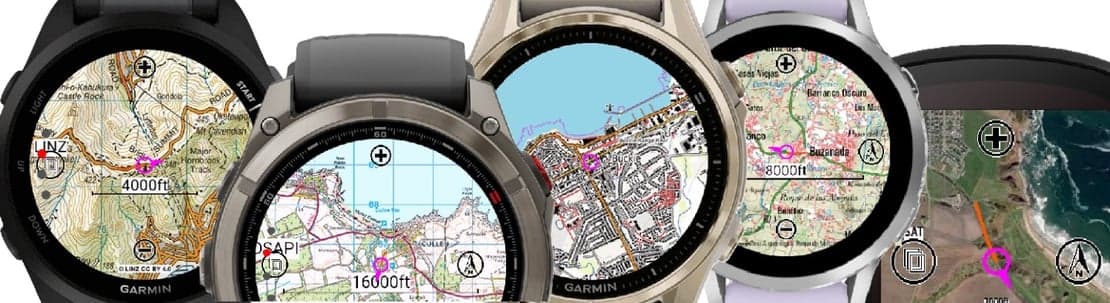
A Forerunner 70 at £220 can display richer, more detailed maps than a Forerunner 970 at £620. That sounds wrong, but it is exactly what Awesome Maps delivers. This third-party mapping solution has quietly become one of the most practical upgrades available to Garmin owners who want navigation without spending serious money on flagship hardware.
What Awesome Maps Actually Does
Awesome Maps is a custom map installation tool that pushes high-quality cartography onto compatible Garmin devices, including entry-level and mid-range Forerunners that ship with basic or no maps at all. The process works because Garmin's lower-tier watches already carry the hardware to render maps. The limitation was always software and pre-loaded data, not processing power. Awesome Maps bypasses that gap by letting you install detailed OpenStreetMap-derived tiles directly onto the device's storage. You get trail detail, road classification, points of interest, and contour lines that rival what Garmin charges a £400 premium to include.
For runners and cyclists, the practical difference is significant. A trail runner using a Forerunner 70 with Awesome Maps can see singletrack branching off a fire road, something a stock Forerunner 265 at £450 won't show without an upgrade. Cyclists doing sportives get junction numbers and road names on-device, without needing a Garmin Edge 840 at £500+. The GPS hardware pulling satellite signals is the same across most of these watches. The map layer on top is what changes the experience.
Compatibility, Setup, and Real-World Performance
The setup process is not plug-and-play. You download map files, connect your Garmin via USB, and drop the files into the correct folder on the device. It takes 20 to 40 minutes depending on the map region size and your familiarity with file management. Regional map packs for Western Europe run around 2 to 4 GB, so storage matters. The Forerunner 70 has enough internal space to handle it, but you are working close to the limit on some devices. Coros Pace 3 owners often run into similar constraints with third-party data, so this is not unique to Garmin.
On-device rendering is genuinely smooth on the Forerunner 70 and similar hardware. Panning and zooming during a run is responsive. Colour differentiation between terrain types is clear on the watch display, which matters when you are glancing down mid-effort at 170bpm. Compared to the built-in maps on a Garmin Fenix 8 or Epix Pro, you are not getting the same polish or automatic map updates. But you are getting 80 percent of the functional value at a fraction of the cost. If you spotted the Garmin Epix Pro deals during [Amazon Prime Day 2026](/en/articles/garmin-amazon-prime-day-2026-deals-epix-pro-instinct-3-edge-540-2026-07-21), this comparison makes even more sense right now.
Who Benefits Most From This
Triathletes using a mid-range Garmin for all three disciplines get the clearest win. You already have the watch. Adding maps means you can use it confidently on an unfamiliar bike course or pre-race run recon without a separate device. Hyrox athletes and CrossFitters who run outdoors between training blocks will also appreciate having turn-by-turn without buying up the product stack. For pure track or road runners who never leave a known route, the upgrade adds little. But anyone doing trail, gravel, or travel events should take this seriously.
The comparison with dedicated navigation watches is worth spelling out. A Garmin Instinct 3 with Awesome Maps sits below £350 and handles mapping tasks that would otherwise require a Fenix 8 at £750+. Polar doesn't offer anything equivalent in third-party map support. Coros has improved its mapping on the Vertix 3, but the ecosystem for third-party cartography is thinner. Apple Watch Ultra 3 has solid maps via the iPhone connection, but native offline map rendering on-device is still behind dedicated sport watches, which is worth remembering if you're considering the [Prime Day Apple Watch Ultra 3 deals](/en/articles/apple-watch-ultra-3-and-series-11-hit-lowest-ever-prime-day-prices-2026-07-21).
What is missing here is worth being honest about. Awesome Maps requires manual updates. There is no automatic sync, no OTA refresh when OpenStreetMap data improves in your region. Garmin's native mapping ecosystem on premium devices handles this automatically. If you are not comfortable managing files on a computer, the setup will feel frustrating. There is also no guarantee of compatibility across all Garmin firmware updates. A watch update could theoretically break the map display, and support options are limited compared to an official product. The community forums help, but this is DIY territory.
The verdict is straightforward. If you own a mid-range Garmin and want trail or road maps without buying a new watch, Awesome Maps is the most cost-effective path available in 2026. It is best suited to runners and cyclists who are comfortable with basic file management and want navigation for occasional off-road or travel use. The alternative is spending £400 more on a Forerunner 970 or Fenix 8. For most athletes, the free or low-cost map files win that argument easily.
Mentioned watches
Head-to-head comparisons
Buying guides